Omegon EQ 500X mit Motornachführung

  • Ersteller des Themas Ersteller des Themas yogi61
  • Erstellungsdatum Erstellungsdatum
Ich habe mal eine Zusammenfassung geschrieben.
 

Anhänge

Die Stellarium Version 24.4 läuft mit dem Prolific Treiber 3.9.0.2 auch!
 
Well, I hope it's not too much of a problem if I post here in english. My german skills are quite limited, and although part of my family lives near Frankfurt I can barely buy bröt without people looking at me strangely :)

In a few words, I'm the author of the INDI/ASCOM driver for the EQ500X. If you have ideas on how to improve the mount driver, I'll gladly accept PRs on github, but I can also study changes if you raise them as issues there. Fact is, after six years, I was just about to give out the mount to someone else (it's 24V so it's a bit bothersome when I do astronomy presentations in the vicinity). I also have no clue if the model I have is compatible with all the models that were sold by Omegon. Probably there were not many.

Cheers, and clear skies!
 
Hi TallFurryMan,

thank you for your contribution. I'm using your driver on an EQ500X Drive in conjunction with the Stellarium software. It works very well and almost turns the EQ500X Drive into a Goto mount. Is there a possibility of further developing the driver (W11)?

The 24 V for the mount is no problem, see here: https://ainuk.amateurfunkpraxis.de/?p=307

There, they convert 18 V to 24 V using a small converter; this solution also works perfectly.

I would be very happy to receive a response here in the forum!

Clear Sky
Juergen
 
You mean the driver is incompatible with Windows 11? I don't own a W11 setup, but this can be resolved. If it's only a matter of rebuilding the driver with new dependencies and a new ASCOM framework, I can do that yes.
 
Hi,

There were problems with the Omegon control box right at the beginning, but that wasn't due to your Ascom driver, but rather to the Prolific driver for the control box. If you could upgrade the Ascom driver to Windows 11, that would still be helpful.

Thanks in advance,
Juergen
 
Ich bin viel zu spät dran, ich weiß. Aber ich habe erst jetzt dieses Problem mit der USB-RS232-Verbindung in Windows 11. Ich habe oben alles gelesen, was yogi61 zu diesem Thema (sehr gut) geschrieben hat. Nun habe ich einen neuen Laptop mit Win11, dieses Kabel von UGreen und es ist ein PL2303TA-Chip drin. Ich habe den Treiber aus 2008 probiert, aber das bringt leider keine Lösung. Unverändert kommt im Gerätemanager "Do not support Windows 11 or later". Solltet ihr noch einen anderen Tipp haben, wäre super. Ansonsten muss ich eben einen anderen Adapter kaufen. Habt ihr dafür einen Tipp, welcher sicher unter Win11 läuft ? DANKE
 
Hallo NickMajoll,

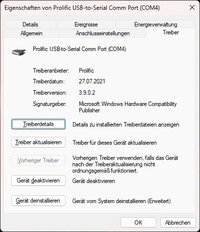
der nachfolgende Treiber läuft einwandfrei unter Windows 11, 25H2!
 

Anhänge

  • Prolific.jpg
    Prolific.jpg
    39,5 KB · Aufrufe: 24
Ach so, noch ein Wort zum Alignement, weil ich auch mehrfach danach gefragt wurde.

Das funktioniert ganz wunderbar wie folgt.

1. Mit dem Polsucher und der App "Polar Clock" die Montierung auf den Nordstern ausrichten. Erster Stern!
2. Hellen Stern am Himmel suchen und Montierung/Teleskop manuell darauf ausrichten.
3. In Stellarium den ausgewählten Stern mit der Maus markieren und dann "Aktuelles Objekt" und "Synchronisieren" anklicken. Zweiter Stern!
4. 2 Stern Alignement durchgeführt.
 
Zurück
Oben