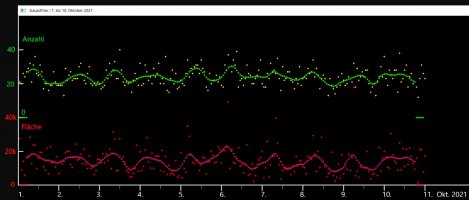
# filter.py  mit Gaußfilter, Boxfilter und Medianfilter
# (C) WiSi 2021
#letzte Änderung 14.10.2021

import numpy as np
import cv2

Magenta = (147, 20, 255)
Yellow = (0, 255, 255)
GREEN = (20, 255, 20,)
BLUE = (255, 0, 0)
WHITE = (200, 200, 200)
RED = (0, 0, 255)

flaeche = np.zeros((1000), np.single)
fflaeche = np.zeros((1000), np.single)
anzahl = np.zeros((1000), np.uint32)
fanzahl = np.zeros((1000), np.single)
izeit = np.zeros((1000), np.uint32)

temp = np.zeros((13), np.uint32)
sorted_temp = np.zeros((13), np.uint32)
ftemp = np.zeros((13), np.single)
fsorted_temp = np.zeros((13), np.single)

# Beschriftung kommt noch
################################## Gaußfilter ########################################################

# Gaußkurve testen und Koeffizienten ausgeben
gauss_summe = 0
for i in range (-5, 6):
    # -5 -4 -3 -2 -1 0 1 2 3 4 5
    x = i / 2.7
    y = np.exp(-x*x/2.0) / np.sqrt(2.0*np.pi) / 0.4
    gauss_summe = gauss_summe + y
    print ("{:8.4f}".format(y))
print()
print ("{:8.4f}".format(gauss_summe))


bg = np.zeros((550, 1900, 3), np.uint8)                                      # Result Screen aufmachen

cv2.line(bg,(1,1),(1,500),(WHITE),2)                      # Y-Skala
cv2.line(bg,(1,499),(1900,499), WHITE,2)                  # X-Skala
for j in range (1,5):
    cv2.line(bg,(0, j * 100),(15, j * 100), WHITE,2)      # Y- Ticks

for j in range (1,11):
    cv2.line(bg,(j * 120, 500),(j * 120, 515), WHITE, 2)   # X- Ticks

for j in range (1,21):
    cv2.line(bg,(j * 60, 500),(j * 60, 510), WHITE, 1)     # X- Ticks


file1 = open('1-10-Oktober.txt', 'r')                                          # Datensatz einlesen
Lines = file1.readlines()

count = 0
for line in Lines:
    position = line.find("UTC")
 #    Hier habe ich die Positionen abgelesen
 #    06 UTC    Anz  32    Fl 28592.5  Fl/Anz   893.52
 #       12345678901234567890123456789012345678901234567890

    if position > 0:
        count +=1
        zeit = line[position-3:position-1]
        anz =  line[position+11:position+15]
        fla =  line[position+20:position+30]
  #     print(' Count ', count, ' z ',zeit, ' anz ', int(anz), ' fla  ', float(fla))
        flaeche[count] = float(fla)
        anzahl[count] = int(anz)
        izeit[count] = int(zeit)
        cv2.circle(bg, (count * 5 , 300 - anzahl[count]*5), 2 , Yellow, -1)        # Originalwerte plotten
        cv2.circle(bg, (count * 5 , 500 - int(flaeche[count]/200)), 2 , RED, -1)
print ('  Anzahl: ',count)

for i in range (6, count-5):                                                       # Filtern und plotten
    summe = 0
    for j in range (-5, 6):
        # -5 -4 -3 -2 -1 0 1 2 3 4 5
        x = j / 2.7
        y = np.exp(-x*x/2.0) / np.sqrt(2.0*np.pi) / 0.4
        y = y * anzahl[i+j]
        summe = summe + y
    fanzahl[i] = summe / gauss_summe  # wurde oben beim Test berechnet
for i in range (1, count):
    cv2.circle(bg, (i * 5 , 300 - int(fanzahl[i]*5)), 2 , GREEN, -1)
#    print (fanzahl[i])

for i in range (6, count-5):
    summe = 0
    for j in range (-5, 6):
        x = j / 2.7
        y = np.exp(-x*x/2.0) / np.sqrt(2.0*np.pi) / 0.4
        y = y * flaeche[i+j]
        summe = summe + y
    fflaeche[i] = summe / gauss_summe  # wurde oben beim Test berechnet
for i in range (1, count):
    cv2.circle(bg, (i * 5 , 500 - int(fflaeche[i]/200)), 2 , Magenta, -1)
#    print (fanzahl[i])

cv2.imshow('  Gaussfilter | 1. bis 10. Oktober 2021', bg)
cv2.waitKey(0)                                                             # Auf Tastendruck gehts weiter
cv2.destroyAllWindows()

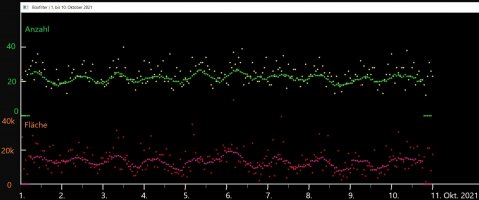
################################## Boxfilter ########################################################

bg = np.zeros((550, 1900, 3), np.uint8)                                     # Result Screen aufmachen

cv2.line(bg,(1,1),(1,500),(WHITE),2)                      # Y-Skala
cv2.line(bg,(1,499),(1900,499), WHITE,2)                  # X-Skala
for j in range (1,5):
    cv2.line(bg,(0, j * 100),(15, j * 100), WHITE,2)      # Y- Ticks

for j in range (1,11):
    cv2.line(bg,(j * 120, 500),(j * 120, 515), WHITE, 2)   # X- Ticks

for j in range (1,21):
    cv2.line(bg,(j * 60, 500),(j * 60, 510), WHITE, 1)     # X- Ticks


file1 = open('1-10-Oktober.txt', 'r')                                          # Datensatz einlesen
Lines = file1.readlines()

count = 0
for line in Lines:
    position = line.find("UTC")
 #    Hier habe ich die Positionen abgelesen
 #    06 UTC    Anz  32    Fl 28592.5  Fl/Anz   893.52
 #       12345678901234567890123456789012345678901234567890

    if position > 0:
        count +=1
        zeit = line[position-3:position-1]
        anz =  line[position+11:position+15]
        fla =  line[position+20:position+30]
  #     print(' Count ', count, ' z ',zeit, ' anz ', int(anz), ' fla  ', float(fla))
        flaeche[count] = float(fla)
        anzahl[count] = int(anz)
        izeit[count] = int(zeit)
        cv2.circle(bg, (count * 5 , 300 - anzahl[count]*5), 2 , Yellow, -1)        # Originalwerte plotten
        cv2.circle(bg, (count * 5 , 500 - int(flaeche[count]/200)), 2 , RED, -1)
print ('  Anzahl: ',count)

for i in range (6, count-5):                                                       # Filtern und plotten
    summe = 0
    for j in range (-5, 6):
        # -5 -4 -3 -2 -1 0 1 2 3 4 5
        summe = summe + anzahl[i+j]
    fanzahl[i] = summe / 11
for i in range (1, count):
    cv2.circle(bg, (i * 5 , 300 - int(fanzahl[i]*5)), 2 , GREEN, -1)
#    print (fanzahl[i])

for i in range (6, count-5):
    summe = 0
    for j in range (-5, 6):
        summe = summe + flaeche[i+j]
    fflaeche[i] = summe / 11
for i in range (1, count):
    cv2.circle(bg, (i * 5 , 500 - int(fflaeche[i]/200)), 2 , Magenta, -1)
#    print (fanzahl[i])

cv2.imshow('  Boxfilter | 1. bis 10. Oktober 2021', bg)
cv2.waitKey(0)                                                             # Auf Tastendruck gehts weiter
cv2.destroyAllWindows()


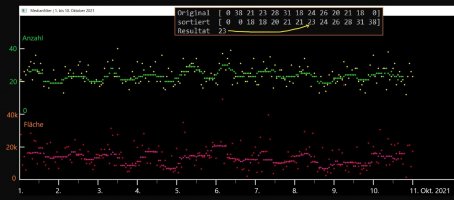
########################## Medianfilter ####################################

bg = np.zeros((550, 1900, 3), np.uint8)                                               # Result Screen

cv2.line(bg,(1,1),(1,500),(WHITE),2)                     # Y-Skala
cv2.line(bg,(1,499),(1900,499), WHITE,2)                 # X-Skala
for j in range (1,5):
    cv2.line(bg,(0, j * 100),(15, j * 100), WHITE,2)     # Y- Ticks

for j in range (1,11):
    cv2.line(bg,(j * 120, 500),(j * 120, 515), WHITE, 2)   # X- Ticks

for j in range (1,21):
    cv2.line(bg,(j * 60, 500),(j * 60, 510), WHITE, 1)     # X- Ticks

file1 = open('1-10-Oktober.txt', 'r')                                         # Datensatz noch mal einlesen
Lines = file1.readlines()

count = 0
for line in Lines:
    position = line.find("UTC")
 #    Hier habe ich die Positionen abgelesen
 #    06 UTC    Anz  32    Fl 28592.5  Fl/Anz   893.52
 #       12345678901234567890123456789012345678901234567890

    if position > 0:
        count +=1
        zeit = line[position-3:position-1]
        anz =  line[position+11:position+15]
        fla =  line[position+20:position+30]
  #     print(' Count ', count, ' z ',zeit, ' anz ', int(anz), ' fla  ', float(fla))
        flaeche[count] = float(fla)
        anzahl[count] = int(anz)
        izeit[count] = int(zeit)
        cv2.circle(bg, (count * 5 , 300 - anzahl[count]*5), 2 , Yellow, -1)        # Originalwerte plotten
        cv2.circle(bg, (count * 5 , 500 - int(flaeche[count]/200)), 2 , RED, -1)
print ('  Anzahl: ',count)


for i in range (6, count-5):                                                         # Filtern und plotten
    for j in range (-5, 6):
# -5 -4 -3 -2 -1 0 1 2 3 4 5
         temp[j+6] = anzahl[i+j]
    sorted_temp = np.sort(temp, kind='quick sort')
#    print(' Original ', temp)
#    print(' sortiert ', sorted_temp)
#    print(' Resultat ', sorted_temp[7])
    cv2.circle(bg, (i * 5 , 300 - sorted_temp[7]*5), 2 , GREEN, -1)

# Original  [ 0 28 15 38 21 23 28 31 18 24 26 20  0]
# sortiert  [ 0  0 15 18 20 21 23 24 26 28 28 31 38]
# Resultat  24   sorted_temp[7]   ^ ist die Mitte der 11

for i in range (6, count-5):
    for j in range (-5, 6):
         ftemp[j+6] = flaeche[i+j]
    fsorted_temp = np.sort(ftemp, kind='quick sort')
    cv2.circle(bg, (i * 5 , 500 - int(fsorted_temp[7]/200)), 2 , Magenta, -1)

cv2.imshow('  Medianfilter | 1. bis 10. Oktober 2021', bg)
cv2.waitKey(0)
cv2.destroyAllWindows()


################ EOF WiSi 2021


 de.wikipedia.org