
Du verwendest einen veralteten Browser. Dieser kann eventuell diese oder andere Webseiten nicht richtig darstellen.
Du solltest deinen Browser aktualisieren oder einen alternativen Browser verwenden.
Du solltest deinen Browser aktualisieren oder einen alternativen Browser verwenden.
erweiterte PHD2 Version für Sonnenbeobachtung!

MARTINARTEM
Aktives Mitglied
@Per_aspera Auf Raspberry Pi 5 mit OS Debian Bookowrom 64Bit, funktioniert PHD2, mit PHD2 Solar habe Ich keine Erfahrung.
MARTINARTEM
Aktives Mitglied
Sehr gerne Günther, probieren geht übers studierenHallo Martin,
Vielen Dank für Deine Antwort! Bei mir laufen alle Windows Rechner mit Windows 11, ich probiere dann mal auf meinem Testrechner aus, beide Versionen parallel zu installieren.
Vielen Dank und viele Grüße,
Günther

Und bei Dir wird auch Parallelbetrieb funktionieren..
CS
Martin
Per_aspera
Aktives Mitglied
Hi Martin,@Per_aspera Auf Raspberry Pi 5 mit OS Debian Bookowrom 64Bit, funktioniert PHD2, mit PHD2 Solar habe Ich keine Erfahrung.
danke fürs Feedback. Das "normale" PHD2 läuft, das stimmt. Mir gehts um die Solar-Variante. Ich hab schon gegoogelt und die KI bemüht, aber so richtig hat das wohl noch niemand unter Linux probiert. Vielleicht versuch ich mal, das selbst zu bauen. Da hab ich halt zwei linke Hände
bzw. keine Erfahrung damit.
Daniel32
Aktives Mitglied
bin mir nicht sicher ob es eine LINUX Version gibt oder nur für PC und MAC!Hat eigentlich jemand das PHD2-Solar schon mal unter Linux (Ubuntu Noble oder Opensuse 15.6) zum Laufen gebracht? Ich bin nicht gerade versiert im Selberbauen, wäre daher für Erfahrungsberichte (und evtl Anleitungen) dankbar
Daniel32
Aktives Mitglied
Vor ein paar Tagen wurde PHD2 Solar nochmals überarbeitet von Version 2.6.14 (Dev 1) auf 2.6.14 (Dev 2).
Hier die Neuerungen und Download-Link!
Viel spass beim testen!
Lg.
Daniel
Hier die Neuerungen und Download-Link!
- Added support for custom ASCOM mount tracking rates in the Planetary tool, significantly improving guiding accuracy for the Moon, especially for high resolution imaging and large lunar mosaics, and providing additional benefits for solar and planetary targets
- Added a new Comet/Minor Body Tracking mode in Planetary Tool, partially overlapping with the Comet Tool, while offering more intuitive controls
- Added direct support for JPL Horizons tracking rate values for easy and accurate input
- Improved integration with upcoming premium HelioMaker features
Download
Viel spass beim testen!
Lg.
Daniel
Daniel32
Aktives Mitglied
Nachdem ich mich drei Monate nicht um die aktuellen Versionen von "PHD2 - Solar" gekümmert habe gibt's seitdem einiges an Updates!!!
Ganz neu ist die Version: PHD2 Solar 2.6.14 (Dev 4) DOWNLOAD (08. Juli 2026)
===========================================================================================================================
Hier findet ihr noch die Neuerungen seit der Version 2.6.14 (Dev 3)!
Neu in 2.6.14 (Dev 3):
Neu in 2.6.14 (Dev 3.1):
Neu in 2.6.14 (Dev 3.2):
Neu in 2.6.14 (Dev 4):
Ganz neu ist die Version: PHD2 Solar 2.6.14 (Dev 4) DOWNLOAD (08. Juli 2026)
===========================================================================================================================
Hier findet ihr noch die Neuerungen seit der Version 2.6.14 (Dev 3)!
Neu in 2.6.14 (Dev 3):
- Guiding now stops automatically if the mount is parked or stops tracking mid-session, with a clear alert
- Guiding crosshair shows the real target from the first calibration frame - no more jump when guiding starts
- Guiding crosshair turns yellow while guiding is paused
- New Random Spiral dithering mode
- Planetary: enhanced comet shift tracking, plus new custom and minor solar system body tracking modes
- New toolbar button to quickly mute/unmute the lost-star bell
- Graph window: new time-cursor overlay, smoother updates, autohide button tooltips, and fixed re-click behavior of the X/Y/Settings popups
- Fixed a deadlock that could hang Player One and ZWO cameras during connect
- Touptek camera library updated to version 60.31631.20260606
- Fixed writing of SER video logs
- Fixed old CameraFrames folders not being cleaned up after 30 days
- Camera simulator: more robust file input and restored cloud effects
- Manual calibration data is now validated before being accepted
- Alert close button now scales correctly on high-DPI displays
- Faster version-update downloads (lifted bandwidth limit)
- Expanded PHD2 server/REST API for imaging clients: mount capabilities and supported rates, and more.
- Numerous stability and robustness fixes (ASCOM mount rate enumeration, event-server shutdown, UI reentrancy, worker-thread dispatch)
Neu in 2.6.14 (Dev 3.1):
- Fixed an annoyance after auto-update for users running PHD2 as a non-default instance: the updated PHD2 would relaunch as instance 1, which usually has no equipment profile, and pop up the New Equipment Wizard unexpectedly. PHD2 now preserves the instance number across self-update.
- One-time rescue for users upgrading from older versions: on first launch, PHD2 automatically switches to the lowest-numbered instance that already has a usable equipment profile, so you go straight to your gear instead of the wizard.
- Guiding now stops automatically if the mount is parked or stops tracking mid-session, with a clear alert
- Guiding crosshair shows the real target from the first calibration frame - no more jump when guiding starts
- Guiding crosshair turns yellow while guiding is paused
- New Random Spiral dithering mode
- Planetary: enhanced comet shift tracking, plus new custom and minor solar system body tracking modes
- New toolbar button to quickly mute/unmute the lost-star bell
- Graph window: new time-cursor overlay, smoother updates, autohide button tooltips, and fixed re-click behavior of the X/Y/Settings popups
- Fixed a deadlock that could hang Player One and ZWO cameras during connect
- Touptek camera library updated to version 60.31631.20260606
- Fixed writing of SER video logs
- Fixed old CameraFrames folders not being cleaned up after 30 days
- Camera simulator: more robust file input and restored cloud effects
- Manual calibration data is now validated before being accepted
- Alert close button now scales correctly on high-DPI displays
- Faster version-update downloads (lifted bandwidth limit)
- Expanded PHD2 server/REST API for imaging clients: mount capabilities and supported rates, and more.
- Numerous stability and robustness fixes (ASCOM mount rate enumeration, event-server shutdown, UI reentrancy, worker-thread dispatch)
Neu in 2.6.14 (Dev 3.2):
- Planetary guiding: improved support for high-resolution guide cameras
- Allow changing the observer site (latitude, longitude, elevation) on mounts that support it
Neu in 2.6.14 (Dev 4):
- Extended object detection framework
- Camera simulator: added realistic cloud simulation
- Camera simulator: added image playback from a folder, with play, pause, stop, and step controls
=========================================================================================================================
Daniel32
Aktives Mitglied
Nur wenige Tage nach dem ich den Download zu PHD2 - solar 2.6.14 (Dev 4) online gestellt habe gibt's nun ein kleines Update mit dem ein oder andern Fix!
Neu in 2.6.14 (Dev 5):
2.6.14 (Dev 5) zum downloaden. Darf natürlich wieder gern geteilt werden!
LG Daniel
Neu in 2.6.14 (Dev 5):
- Fixed a PHD2 shutdown hang that could occur while the mount was still guiding
- Fixed guiding controller wedging in calibration wait
- Debounced mount-not-tracking before cancelling guiding
- Expanded event server REST API
2.6.14 (Dev 5) zum downloaden. Darf natürlich wieder gern geteilt werden!
LG Daniel
alffrommars
Aktives Mitglied
Bescheidene Frage aber muss die Sonne zum guiden dazu mittig sein im Guidescope?
Wenn man mit dem Hauptgerät sozusagen nur ne Ecke aufnehmen möchte ( Details bei Protuberanzen).
Gruss
Marco
Wenn man mit dem Hauptgerät sozusagen nur ne Ecke aufnehmen möchte ( Details bei Protuberanzen).
Gruss
Marco

_Jürgen_K
Aktives Mitglied
Hallo Marco,
nein, die Sonne muss im Guider nicht in der Mitte sein. Je nach dem, ob Du den oberen oder den unteren Sonnenrand aufnehmen möchtest, ist die Sonnescheibe auf der Guiding-Kamera ja nicht an der gleichen Stelle.
Was aber (glaube ich) erforderlich ist, dass die Sonnenscheibe komplett im Guiderfenster ist, Ich denke, es wird nicht funktionieren, wenn sie nur zum Teil zu sehen ist.
Ich verwende daher zum Guiden bei dem Sonnenteleskop eine ASI1600MM, die einen recht großen Sensor hat, so dass die Sonne immer komplett im Guiderfenster ist.
CS
Jürgen
nein, die Sonne muss im Guider nicht in der Mitte sein. Je nach dem, ob Du den oberen oder den unteren Sonnenrand aufnehmen möchtest, ist die Sonnescheibe auf der Guiding-Kamera ja nicht an der gleichen Stelle.
Was aber (glaube ich) erforderlich ist, dass die Sonnenscheibe komplett im Guiderfenster ist, Ich denke, es wird nicht funktionieren, wenn sie nur zum Teil zu sehen ist.
Ich verwende daher zum Guiden bei dem Sonnenteleskop eine ASI1600MM, die einen recht großen Sensor hat, so dass die Sonne immer komplett im Guiderfenster ist.
CS
Jürgen
Daniel32
Aktives Mitglied
In nächster Zeit möchte ich meine "2600 MM Duo" also jene die Haupt- und Guiding-Chip in einem Gehäuse hat, mal zum gleichzeitigen Aufnehmen und guiden der Sonne verwenden. Weiß noch nicht ob es funktioniert, werde euch aber berichten!Bescheidene Frage aber muss die Sonne zum guiden dazu mittig sein im Guidescope?
Wenn man mit dem Hauptgerät sozusagen nur ne Ecke aufnehmen möchte ( Details bei Protuberanzen).
Gruss
Marco
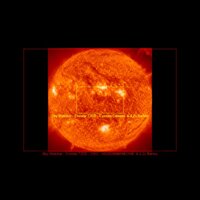
Wie Jürgen schon sagte, muss das Haupt- und Guidingteleskop nicht unbedingt aufeinander ausgerichtet, sein! Was aber sein könnte das die Sonne innerhalb des Fensters sein muss!
Ich hab mir mal den FOV der Hauptkamera und der Guidingkamera (incl. 4,2x Barlow des Daystar Gemini) erstellen lassen
astronomy.tools
 astronomy.tools
Hauptkamera: Rot
Guidingkamera: Gelb
Ich werde aber wahlweise die beiden Kameras in der Software (PHD2 Solar / Sharpcap) vertauschen um den Ausschnitt zu variieren!
LG Daniel
Anhänge
Zuletzt bearbeitet:

holgimetal
Mitglied
Hallo,
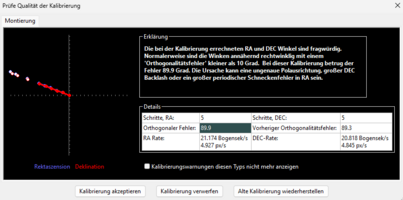
vielleicht kann mir jemand helfen. Das Programm gibt die im Anhang befindliche Fehlermeldung aus. Ich vermute ja, das es an einer nicht korrekten Polausrichtung liegt, aber wie bekomme ich die bei Tag hin? Ich habe es grob mittels Kompas ausgerichtet.
vielleicht kann mir jemand helfen. Das Programm gibt die im Anhang befindliche Fehlermeldung aus. Ich vermute ja, das es an einer nicht korrekten Polausrichtung liegt, aber wie bekomme ich die bei Tag hin? Ich habe es grob mittels Kompas ausgerichtet.
Anhänge
holgimetal
Mitglied
Hat sich erstmal erledigt. Ich habe die Montierung von "on-camera" auf den Ascom Treiber für die iOptron umgestellt... und seitdem scheint es zu funktionieren. Läuft seit gut zehn Minuten stabil und die Sonne bleibt in der Bildmitte.
Daniel32
Aktives Mitglied
Es gibt nun ein Fix auf Dev 5.1 Releases · Eyeke2/phd2.planetaryHat sich erstmal erledigt. Ich habe die Montierung von "on-camera" auf den Ascom Treiber für die iOptron umgestellt... und seitdem scheint es zu funktionieren. Läuft seit gut zehn Minuten stabil und die Sonne bleibt in der Bildmitte.
LG Daniel
Neu in 2.6.14 (Dev 5.1)
- Fixed a modal error dialog that could block guiding until it was dismissed
Daniel32
Aktives Mitglied
Und schon wieder ein Update, diesmal in Dev 6.1 DOWNLOAD
Neu in 2.6.14 (Dev 6.1)
Neu in 2.6.14 (Dev 6.1)
- Added experimental guide-star cloud and haze detection telemetry.
- Improved guiding and shutdown reliability.
- New experimental NINA Cloud Guard plugin 1.4.0.1 (for N.I.N.A. 3.2 and N.I.N.A. 3.3 nightly build 50)
Ich möchte euch an dieser Stelle auf die Software HelioMaker 2.0 hinweisen, diese wurde ebenfalls von LEO SCHATZ entwickelt
und beinhaltet "PHD2 - solar" guidingsoftware! Ein großes PLUS soll sein das kein separates Guide-Scope benötigt wird, sofern
das Teleskop recht gut aufgestellt und eingenordet ist.
Bericht: HelioMaker 2.0
Download: HelioMaker 2.0 Homepage
Lg
Daniel
alffrommars
Aktives Mitglied
Für was soll das HelioMaker gut sein außer die Brieftasche zu leeren?
Das kann nix ... man braucht sharpcap pro dafür, nur kann sharpcap ja die Sonne guiden und man kann sie dabei sogar aufnehmen.
Warum dann nochmal 200 Tacken ausgeben für nix?
Gruss
Marco
Das kann nix ... man braucht sharpcap pro dafür, nur kann sharpcap ja die Sonne guiden und man kann sie dabei sogar aufnehmen.
Warum dann nochmal 200 Tacken ausgeben für nix?
Gruss
Marco
Daniel32
Aktives Mitglied
Ja Heliomaker ist teuer (200€) Lebenslange Laufzeit und ja Sharpcap Pro hat "Feature Tracking", das aber bei vielen einschließlich mir fast nie funktioniert! Daher habe ich hier eine Alternative!Für was soll das HelioMaker gut sein außer die Brieftasche zu leeren?
Das kann nix ... man braucht sharpcap pro dafür, nur kann sharpcap ja die Sonne guiden und man kann sie dabei sogar aufnehmen.
Warum dann nochmal 200 Tacken ausgeben für nix?
Gruss
Marco
grüße
Daniel

Dane Vetter
Aktives Mitglied
Hallo Daniel,
ich hatte während der vergangenen SoFi den Heliomaker sowie erweiterte PHD2 Version (Die Version welche kurz vor der SoFi noch erschien) im Einsatz. Während das bei den Trockenübungen bei normaler Sonne zuverlässig funktioniert hat, scheiterte es leider wie hier im ersten Video im folgenden Thread zu sehen:
Wobei scheitern etwas hart ausgedrückt ist, das Guiding hat die Sonne im Bild gehalten, aber irgendwie wanderte der Schwerpunkt gefühlt in Richtung beleuchteter Seite, was zu einem eiern geführt hat.
Persönlich finde ich Heliomaker für seine (Zwischen-)Funktion auch zu teuer. Ich habe aktuell einfach nur das Jahres-Abo für nen 50er. Habe es aber nicht auf dem Plan, das jährlich 50 zu zahlen.
ich hatte während der vergangenen SoFi den Heliomaker sowie erweiterte PHD2 Version (Die Version welche kurz vor der SoFi noch erschien) im Einsatz. Während das bei den Trockenübungen bei normaler Sonne zuverlässig funktioniert hat, scheiterte es leider wie hier im ersten Video im folgenden Thread zu sehen:

Hallo zusammen,
ich habe bei der Bearbeitung meiner Aufnahmen der Sonnenfinsternis vom 12. August ein Problem gehabt, das vermutlich einige kennen, die Zeitraffer aus längeren Bildserien erstellen: Die Sonne sollte über alle Einzelbilder möglichst exakt an derselben Position sitzen. Ich hatte zwar während den Aufnahmen das Guiding drinnen, aber irgendwie hat da snicht ganz zuverlässig geklappt. Die Sonne wanderte zwar nicht raus, aber wirklich zentriert wurde sie auch nicht.
Bei einer vollständigen Sonnenscheibe ist das noch relativ einfach. Schwieriger wird es jedoch...
ich habe bei der Bearbeitung meiner Aufnahmen der Sonnenfinsternis vom 12. August ein Problem gehabt, das vermutlich einige kennen, die Zeitraffer aus längeren Bildserien erstellen: Die Sonne sollte über alle Einzelbilder möglichst exakt an derselben Position sitzen. Ich hatte zwar während den Aufnahmen das Guiding drinnen, aber irgendwie hat da snicht ganz zuverlässig geklappt. Die Sonne wanderte zwar nicht raus, aber wirklich zentriert wurde sie auch nicht.
Bei einer vollständigen Sonnenscheibe ist das noch relativ einfach. Schwieriger wird es jedoch...
- Dane Vetter
- Antworten: 27
- Forum: Astrofotografie und Software zur Bildbearbeitung

Wobei scheitern etwas hart ausgedrückt ist, das Guiding hat die Sonne im Bild gehalten, aber irgendwie wanderte der Schwerpunkt gefühlt in Richtung beleuchteter Seite, was zu einem eiern geführt hat.
Persönlich finde ich Heliomaker für seine (Zwischen-)Funktion auch zu teuer. Ich habe aktuell einfach nur das Jahres-Abo für nen 50er. Habe es aber nicht auf dem Plan, das jährlich 50 zu zahlen.
alffrommars
Aktives Mitglied
Also bei mir funktioniert das guiding mit sharpcap sowohl bei full disc als auch bei Details einwandfrei.
Ganz selten tanzt da mal was aus der Reihe, falls doch dann nochmal neu calibrieren und dann hauts auch hin.
Gruss
Marco
Ganz selten tanzt da mal was aus der Reihe, falls doch dann nochmal neu calibrieren und dann hauts auch hin.
Gruss
Marco
Daniel32
Aktives Mitglied
ich habs die vergangenen Monate schon so oft probiert mit future "tracking" ich glaub 3x hab ich es hinbekommen, sonst nie!Also bei mir funktioniert das guiding mit sharpcap sowohl bei full disc als auch bei Details einwandfrei.
Ganz selten tanzt da mal was aus der Reihe, falls doch dann nochmal neu calibrieren und dann hauts auch hin.
Gruss
Marco
PHD2 solar funktioniert natürlich auch sehr gut (allerdings muss man die zusätzliche Kamera und GuideScope im Preis und Gewicht berechnen!
schöne Grüße
Daniel
Daniel32
Aktives Mitglied
Danke dir für die info, ich hoffe ich komme in den nächsten Tagen dazu Heliomaker zu testen! Ich finde es aber spannend da man sich Preis und Gewicht von Guidecam-/scope ersparen würde.Hallo Daniel,
ich hatte während der vergangenen SoFi den Heliomaker sowie erweiterte PHD2 Version (Die Version welche kurz vor der SoFi noch erschien) im Einsatz. Während das bei den Trockenübungen bei normaler Sonne zuverlässig funktioniert hat, scheiterte es leider wie hier im ersten Video im folgenden Thread zu sehen:
Hallo zusammen,
ich habe bei der Bearbeitung meiner Aufnahmen der Sonnenfinsternis vom 12. August ein Problem gehabt, das vermutlich einige kennen, die Zeitraffer aus längeren Bildserien erstellen: Die Sonne sollte über alle Einzelbilder möglichst exakt an derselben Position sitzen. Ich hatte zwar während den Aufnahmen das Guiding drinnen, aber irgendwie hat da snicht ganz zuverlässig geklappt. Die Sonne wanderte zwar nicht raus, aber wirklich zentriert wurde sie auch nicht.
Bei einer vollständigen Sonnenscheibe ist das noch relativ einfach. Schwieriger wird es jedoch...
- Dane Vetter
- Antworten: 27
- Forum: Astrofotografie und Software zur Bildbearbeitung
Wobei scheitern etwas hart ausgedrückt ist, das Guiding hat die Sonne im Bild gehalten, aber irgendwie wanderte der Schwerpunkt gefühlt in Richtung beleuchteter Seite, was zu einem eiern geführt hat.
Persönlich finde ich Heliomaker für seine (Zwischen-)Funktion auch zu teuer. Ich habe aktuell einfach nur das Jahres-Abo für nen 50er. Habe es aber nicht auf dem Plan, das jährlich 50 zu zahlen.
Dane Vetter
Aktives Mitglied
Das Prinzip finde ich auch spannend, und bei der normalen Sonne funktionerte das bei mir auch tadellos. -> Erfahrungen mit HelioMaker, Solar Guiding und Drift Alignment gesucht
Nur bei der Sonnenfinsternis eben nicht sauber.
Nur bei der Sonnenfinsternis eben nicht sauber.
Daniel32
Aktives Mitglied
Neu in PHD2 solar, Version: 2.6.14 (Dev 6.3)
Download
- Bugfix version of NINA CloudGuard 1.4.0.14
- Improved cloud telemetry diagnostics
- Added an option to continue guiding when a mount incorrectly reports tracking as stopped
- Fixed intermittent Windows registry errors due to concurrent access
- Backport fixes from PHD2 2.6.14dev1
Download
Daniel32
Aktives Mitglied
ich konnte HelioMaker 2.0 vor ein paar Tagen testen! Funktioniert gut bis auf ein paar kleine Verbindungsfehler mit SharpCap, aber ich denke das wird in den nächsten Updates sicher auch bereinigt werden!Das Prinzip finde ich auch spannend, und bei der normalen Sonne funktionerte das bei mir auch tadellos. -> Erfahrungen mit HelioMaker, Solar Guiding und Drift Alignment gesucht
Nur bei der Sonnenfinsternis eben nicht sauber.
Daniel32
Aktives Mitglied
Hier gibt's das Update PHD2 - Solar Version 2.6.14 (Dev 7) DOWNLOAD
Neue Funktionen:
Neue Funktionen:
- Cloud detection improvements
- Optional rejection of elongated stars
- Fixed a client/server communication issue that could occasionally lose requests
- Closing PHD2 while equipment is still connected is now handled properly
- Fixed bug that could cause malformed log records or crash PHD2
- Compatible with Cloud Guard 1.4.0.49